Laptops, smartphones, screens, tools, badges, keys: a company's equipment is a significant investment. Yet equipment tracking is rarely handled with the same rigour as budgets or contracts. While the company is small, everyone knows "who has what". As it grows, that informal knowledge fades away.
IT managers, Office Managers and HR teams know the result all too well: an Excel file that is never up to date, equipment nowhere to be found when someone leaves, duplicate purchases because nobody knows what is sitting in a cupboard. These gaps in equipment tracking and management weigh on both budgets and team time.
The good news: reliable equipment tracking requires neither complex processes nor cutting-edge tools. It relies on a few simple best practices, applied consistently. Here are the ones that really make a difference.
Why does equipment tracking break down?
Before talking about solutions, you need to understand where the loss of visibility over your equipment fleet comes from. In most organisations, the same causes come up:
- Multiple sources: a spreadsheet in IT, a list in HR, notes in Facilities. Everyone has their own version, and none of them is right.
- Irregular updates: the file is corrected after the annual inventory, then nobody touches it for months.
- No traceability of movements: you know who holds an item today, but not who had it before, or why it changed hands.
- Poorly prepared departures: without an exact list of the equipment assigned, returns are done from memory.
The best practices below address each of these issues one by one.
6 best practices for effective equipment tracking
1. Centralise your entire fleet in a single source
This is the foundation for everything else. As long as information is scattered, no practice will hold. Bring all your equipment together in a single repository: IT, phones, tools, accessories, keys and badges. Every department should consult and update this same repository, not its own copy.
One thing to watch: decide from the outset who is responsible for updating it. A single source with no owner soon becomes an abandoned file again.
2. Create a complete record for each item
Each item needs a clear identity. For every one, record at least:
- the category, brand and model;
- the serial number or an internal ID;
- the purchase date and, where applicable, the warranty end date;
- its current status (in use, in stock, under repair, out of service);
- where it is stored or used.
This record becomes the item's memory throughout its lifecycle: the useful information is all there, with no need to dig through emails or invoices.
3. Assign each item to a named employee
Equipment "assigned to the team" is assigned to nobody. Link each item to a specific employee, and have the handover confirmed: a signature, an equipment handover form or a confirmation in your tool. Responsibility is clear from day one, which reduces disputes in case of loss or damage.
4. Keep a history of assignments
Knowing who holds an item is useful. Knowing who held it and when is essential. This traceability lets you answer concrete questions: who was this computer assigned to when it broke down? How long has this screen been in circulation? The history also avoids endless discussions when someone leaves, since the list of equipment assigned to them is known.
5. Identify each item with a QR code
Retyping serial numbers is slow and error-prone. A QR code label stuck on each item lets you pull up its record with a single smartphone scan. In practice, it helps you:
- instantly open the record of an item that has been found or lent;
- confirm an assignment or a return without re-entering data;
- make inventories easier by scanning equipment as you go.
6. Schedule regular equipment checks instead of a single annual inventory
The year-end inventory, massive and time-consuming, gives you a snapshot that is out of date the very next day. Opt for small, regular checks instead: one department or one equipment category per month, or a check at every movement (arrival, departure, change of role). Discrepancies are spotted early, while they are still easy to fix.
Building equipment tracking into key moments of the employee journey
Equipment losses mostly happen during transitions. Three moments deserve special attention:
- Arrival (onboarding): prepare and assign equipment before day one, and have the handover confirmed.
- Change of role or site: update the assignment when the change happens, not three months later.
- Departure (offboarding): produce the list of assigned equipment as soon as the departure is announced, and plan the return with HR.
By linking these steps to your existing HR processes, tracking stops being an extra task: it becomes second nature.
Common equipment tracking mistakes to avoid
- Trying to track everything at once: start with the most expensive or sensitive equipment, then expand.
- Overlooking small items: keys, badges, adapters and headsets often disappear without a trace.
- Multiplying tools: every new data source is another chance for discrepancies.
- Not explaining the process to users: a rule nobody understands will not be followed.
Conclusion: equipment tracking that is simple, regular and shared
Good equipment tracking is not about sophistication, but about consistency: a single source, one record per item, named assignments, a history and frequent checks. These habits save IT time, secure departures for HR and avoid unnecessary repurchases.
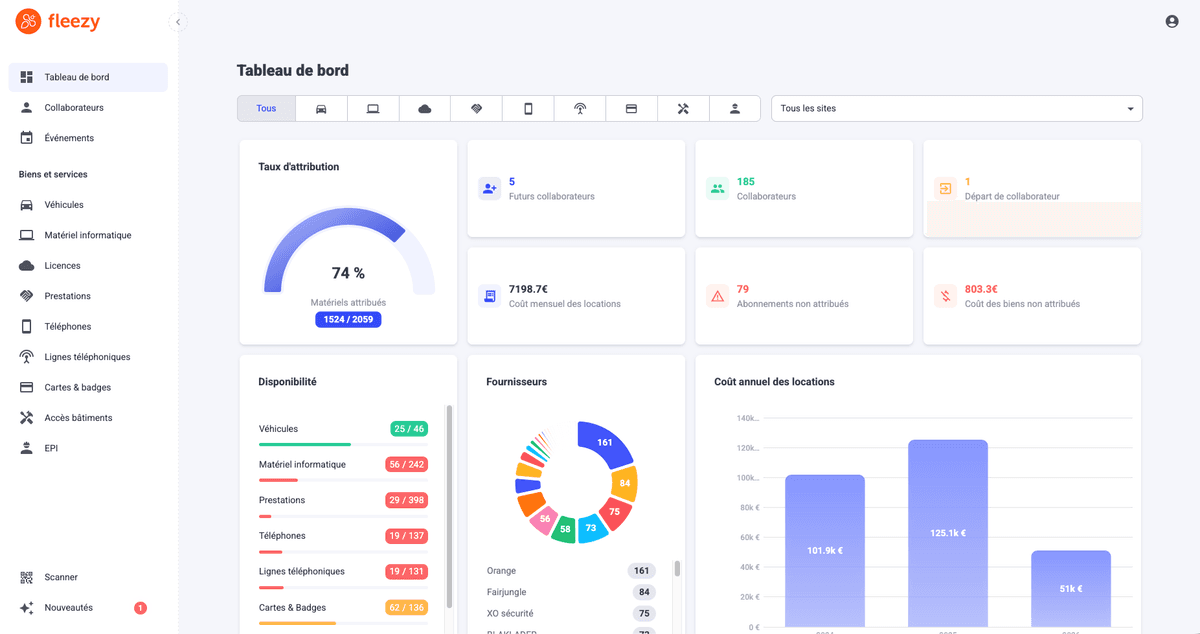
Beyond a few dozen employees, a spreadsheet is no longer enough to keep these rules going over time. That is where equipment tracking software takes over. Fleezy was designed with this in mind: centralise your equipment fleet, keep one record per item, retain the assignment history for each employee and identify every item with a QR code.
FAQ: equipment tracking in the workplace
Start by bringing your entire fleet together in a single repository, with one record per item. Then assign each item to a named employee, keep a history of movements and schedule regular checks. A QR code on each item speeds up updates.
A spreadsheet can be enough for a small team. It quickly shows its limits once several departments update it: multiple versions, no history, no scanning. Equipment and asset tracking software like Fleezy centralises your data, traces every assignment and lets you find any item with a single scan.
As soon as the departure is announced, produce the list of equipment assigned to them. Plan the return with HR before their last day, check the condition of each item and have a return form signed. Without an assignment history, this step relies on memory.
It is strongly recommended. The form records what was handed over, on what date and in what condition. It clarifies the employee's responsibility and serves as a reference when the equipment is returned. A confirmation in your tracking tool can play the same role.